
01 — Ingest
Ingest
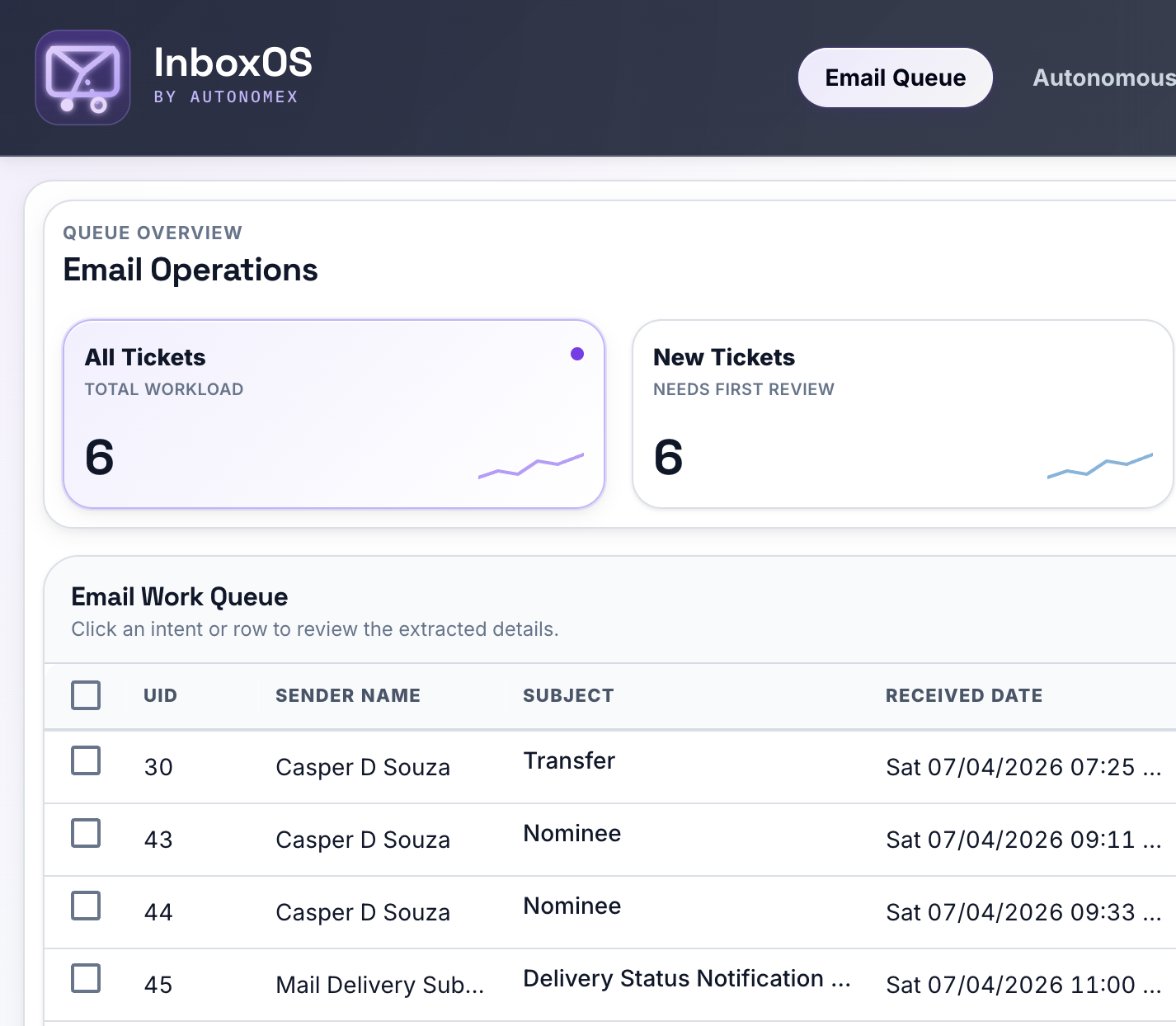
IMAP fetch from Gmail, MIME parsing, PDF attachment text extraction, and deduplication into a durable ticket store.
TL;DR
For private-banking and wealth-management client-email desks — AutonomeX builds the platform; InboxOS is the product.
InboxOS ingests client email, runs a governed multi-agent analysis pipeline, and routes work to the right queue — with full audit trails and human review before anything is sent.
Product scope
The problem
Wealth management, private banking, and similar desks receive high volumes of unstructured client email — each message carrying compliance risk, missing context, and SLA pressure.
Built for private-banking and wealth-management support desks — where every email is a compliance artifact.
How it works
A single-tenant deployment watches your Gmail inbox, classifies each message, and surfaces structured work to your team.
01 — Ingest
IMAP fetch from Gmail, MIME parsing, PDF attachment text extraction, and deduplication into a durable ticket store.
02 — Analyze
A LangGraph pipeline scores sentiment, classifies intent, extracts required fields, and assesses risk — logged step by step.
03 — Route
The Decision Engine assigns each email to autonomous or human-review queues based on configurable confidence and risk rules.
04 — Resolve
Staff review, edit drafts, assign owners, and send replies — every action recorded in an append-only audit log.
Day in the life
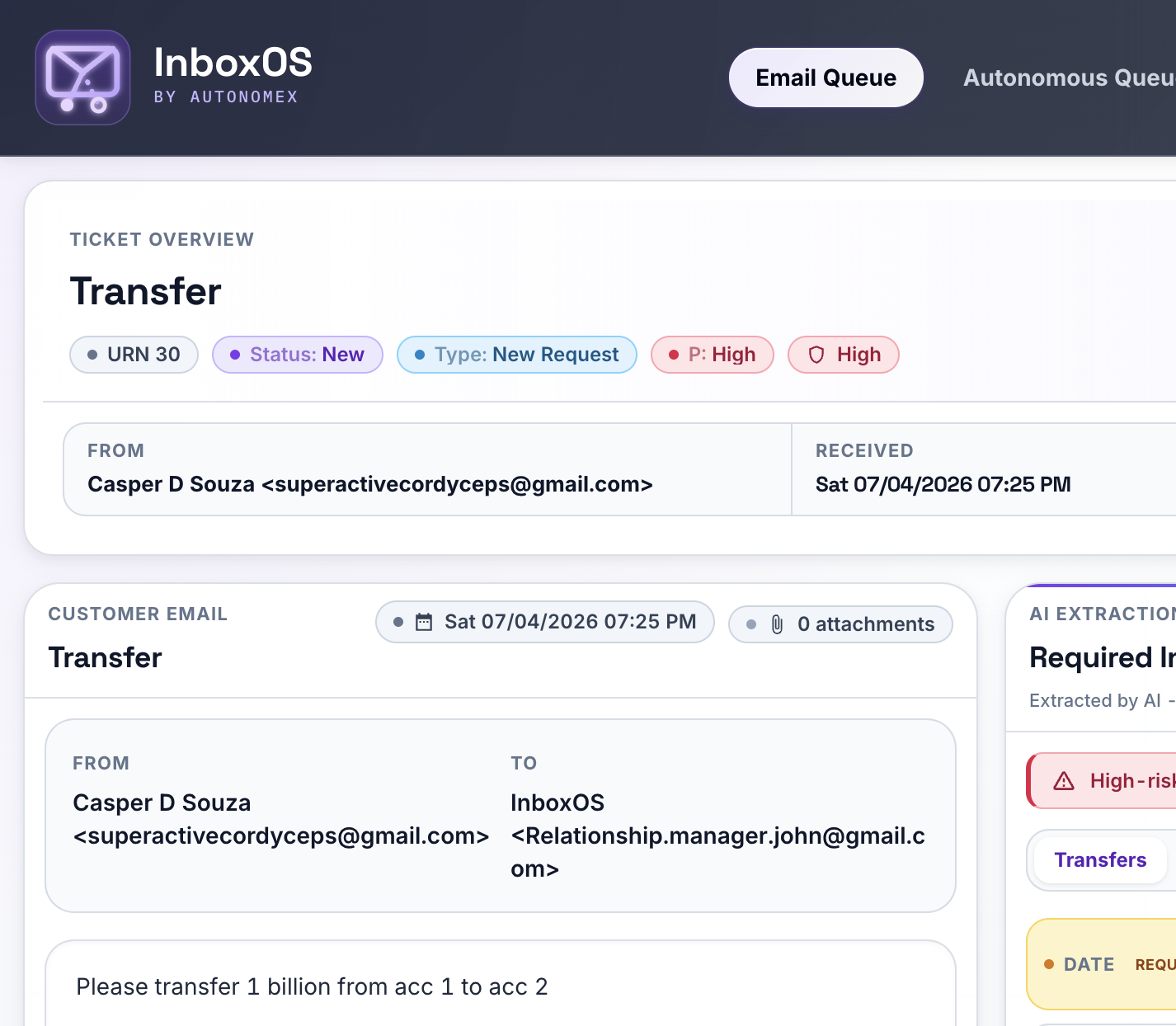
A wire-transfer request shows how ingest, AI analysis, human review, and audit logging fit together. No auto-reply — staff approve every outbound message.
“Please transfer 1 billion from acc 1 to acc 2”
Arrives in your monitored Gmail inbox like any other client message.
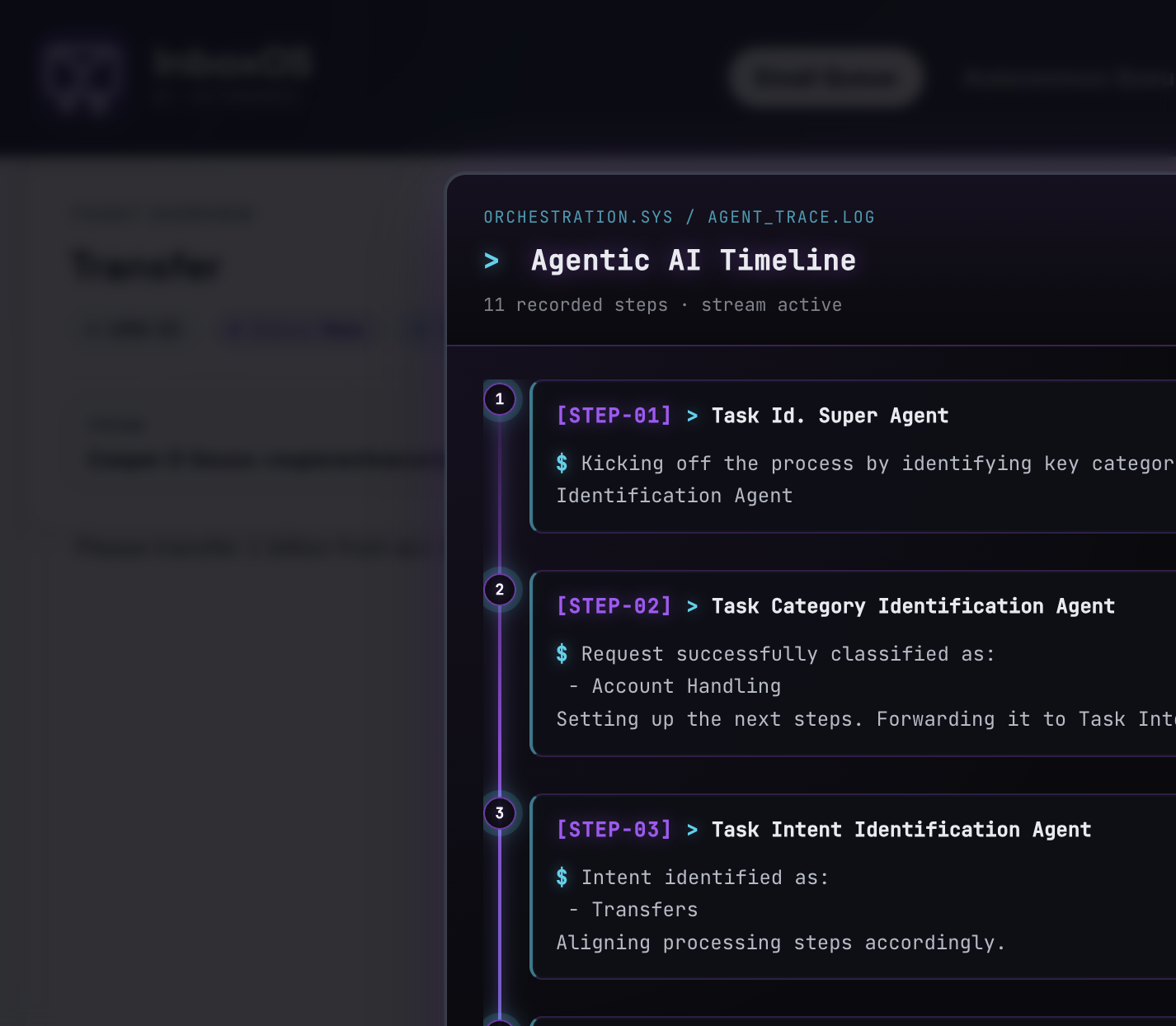
IMAP fetch, dedupe, and the nine-agent pipeline run — sentiment scored, intent identified as Transfers from the Wealth Management pack.
Required fields populate: Amount, Source Account, Destination Account. Missing fields (e.g. Date Required) are flagged — not guessed.
High intent risk → Human Review Required queue — even when confidence is moderate. The Decision Engine applies your configured rules.
Staff verify extraction, edit fields, review the author-agent draft if needed, and explicitly send. Every hop logged in the Agentic AI Timeline.
Differentiator
Not a single prompt. A LangGraph state machine routes each email through specialized agents. The orchestrator picks the next hop each cycle; watch tower scores priority and risk before the Decision Engine.
Entry
Sentiment Analysis
Urgency score 1–10
Classify
Classification
Pack-defined categories
Intent
Intent Agent
Sub-intents + confidence
Fallback
Miscellaneous
Out-of-taxonomy mail
Router
Orchestrator
LLM ReAct loop — routes between all agents until watch tower
Context
History Agent
New / follow-up / duplicate
Extract
Extraction Agent
Structured required fields
Draft
Author Agent
Clarification drafts — human sends
Score
Watch Tower
Priority, risk, confidence → Decision Engine
Every hop is logged in the Agentic AI Timeline — prompt versions, parsed outputs, and routing triggers — so compliance and ops teams can reconstruct why a ticket landed where it did.
Platform
A React queue UI on top of a Flask API — role-aware views, structured extraction, and analytics your supervisors already expect.
Autonomous, manual review, and no-action queues with filters, assignment, and ticket ageing.
Required fields per intent, editable in place. Human edits flip touchless validation off.
Author agent proposes clarification emails. Staff review and edit before send.
JWT auth with role permissions. Assign tickets to RM, support, CSA, or escalation owners.
Volume, sentiment, ticket ageing, and queue throughput — export-ready for ops reviews.
Append-only audit log, job-run history, and admin triggers — every sensitive action recorded.
Decision engine
Touchless does not mean unsupervised. The Decision Engine applies configurable rules — default: high confidence and low risk — before an email enters the autonomous queue.
Thresholds live in config — not hardcoded — so your compliance team sets the bar.
IF confidence ≥ 7
AND intent_risk == "low"
THEN → Autonomous queue
ELSE → Human review queue
Autonomous tickets are closed without manual handling — but outbound email always passes human review before send. High-risk or low-confidence work stays in HITL queues with full agent logs attached.
Autonomous queue
Human review queue
Industry packs
Intents, prompts, risk matrices, and required fields ship as versioned YAML packs. Swap packs to adapt the pipeline — without rewriting agents.
Shipped
Private banking and wealth-management support desks — 4 categories, 13 intents, versioned prompts.
Platform
The core platform is industry-agnostic. Additional verticals are configured — not assumed out of the box.
Security & data
Plain answers — no marketing gloss. Forward this section or download the one-pager for your review committee.
Email bodies and attachment text are processed by the LLM provider you configure (OpenAI via API today) to classify intent and extract fields. Messages are sent through the provider’s API — not used to train public models under standard OpenAI API terms. All classification results, extracted fields, and agent logs are stored in your deployment’s database (SQLite by default; PostgreSQL on roadmap).
No in the current release. The author agent may draft clarification emails when required fields are missing, but outbound send requires explicit staff action in the queue UI. feature_flags.autonomous_send ships off by design.
Every agent hop is logged in the Agentic AI Timeline — orchestrator routing triggers, parsed LLM outputs, and prompt versions used per run. Sensitive UI actions (assignment, send, admin triggers) append to an immutable audit log.
JWT authentication with role-based permissions gates queue views, ticket edits, sends, and admin surfaces. Roles include Relationship Manager, Support Professional, Client Service Associate, Escalation Specialist, and admin — each mapped to specific API permissions.
Today: Docker single-tenant — one organization per instance on your infrastructure. Email credentials and API keys resolve through configurable secret refs, not source code. Multi-tenant SaaS is roadmap, not current product.
Gmail via IMAP ingest and SMTP send. Outlook and additional connectors are on the roadmap — not claimed as shipped. SSO and enterprise identity are also roadmap items.
Enterprise readiness
JWT authentication with permission-gated routes. Roles map to queue actions, admin jobs, and audit access.
Auth events, assignment changes, and sensitive ticket actions recorded immutably for reconstruction.
Deploy on your infrastructure today — one organization per instance. Multi-tenant SaaS is roadmap, not current product.
AI drafts; people approve. No unsupervised client-facing replies in the current release.
Who it's for
Customers interact by email only. Your staff work tickets in InboxOS — with views tuned to how each role operates.
Relationship Manager
Review high-touch threads, approve drafts, and keep context on complex portfolios without re-reading entire chains.
Support Professional
Work manual-review tickets with pre-extracted fields, suggested intents, and clarification drafts ready to edit.
Client Service Associate
Route routine account and document requests through structured workflows — less copy-paste from old threads.
Escalation Specialist
Prioritize by sentiment and intent risk, override AI extraction, and assign ownership when cases cross desks.
Next step
Walk through ingest, the nine-agent pipeline, and human review queues with your compliance and ops stakeholders. Gmail integration today; additional connectors on the roadmap.
Typical demo: 30 minutes · ops + compliance welcome · response within 1 business day
We copied your message to the clipboard. Paste it into an email to sam@autonomex.ai — or use the button below if your mail app is configured.
Expect a reply within 1 business day.
Prefer email directly? sam@autonomex.ai