TL;DR

  • Pilot open for wealth-management desks
  • Routine email triaged · humans approve every send
  • Single-tenant on your infra · full audit trail
Apply for the pilot
Pilot open · Wealth-management client-email desks

Your client-email desk, triaged and audit-ready. Humans still approve every reply.

Built for wealth-management and private-banking client-service teams.

InboxOS sorts, routes, and drafts responses to routine client email automatically, so your relationship managers spend their time on judgment calls instead of triage. Every outbound reply waits for a person to approve it.

  • Routine email triaged automatically
  • Every reply human-approved before send
  • Audit trail you can reconstruct in minutes

Under the hood: a nine-agent LangGraph pipeline, single-tenant Docker on your infrastructure, RBAC, and an append-only audit log.

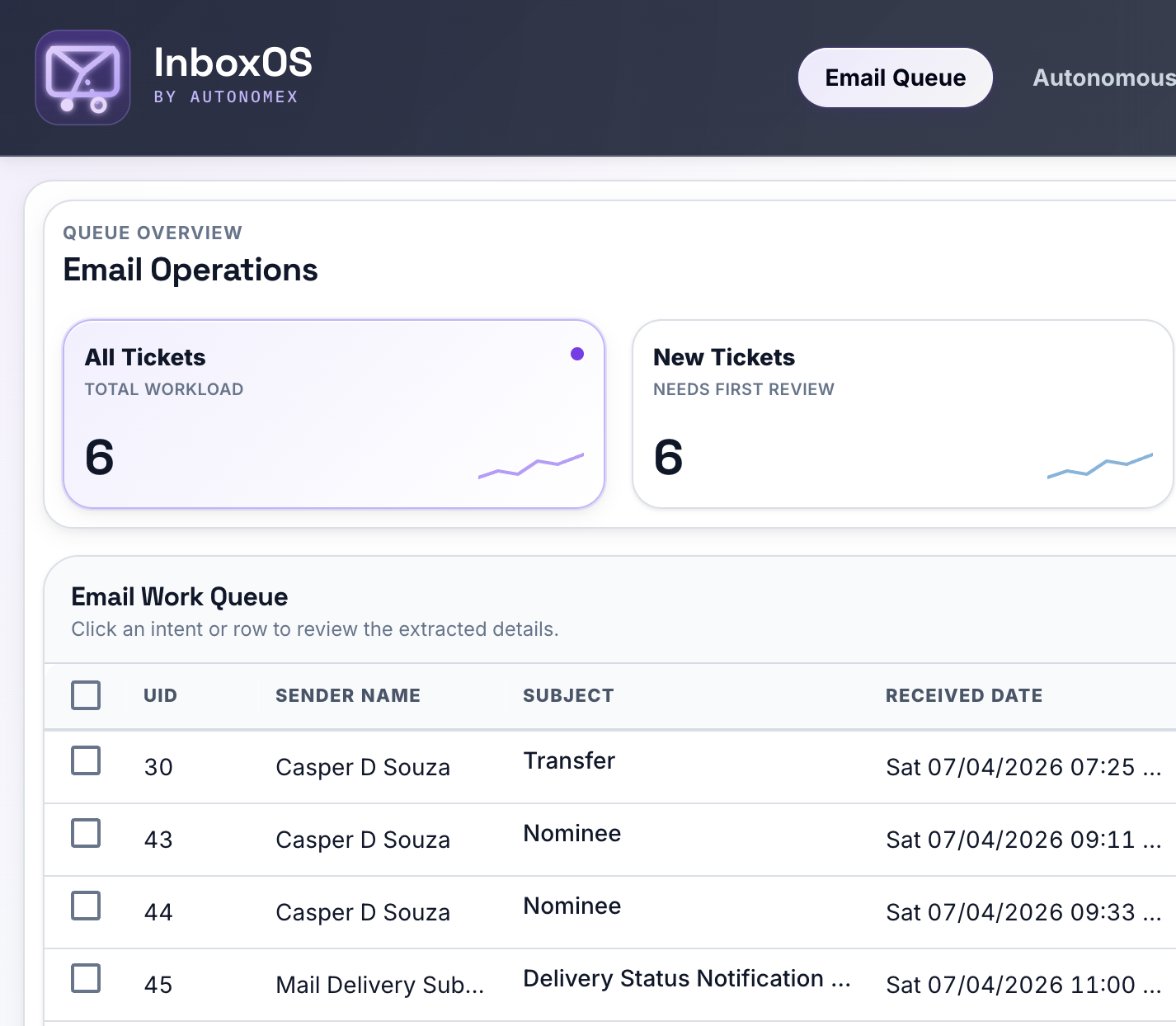
InboxOS Email Work Queue showing classified tickets with intent, risk level, and human-review process status
Live product · Email Work Queue

Product scope

Shipped today versus roadmap

Shipped today

  • Gmail IMAP ingest and SMTP send
  • 9-agent LangGraph classification pipeline
  • Wealth Management industry pack
  • RBAC, JWT auth, append-only audit log
  • Docker single-tenant deployment
  • Human review before outbound send

On the roadmap

  • Outlook and additional email connectors
  • SSO / enterprise identity
  • Multi-tenant SaaS
  • Additional industry packs (insurance, legal, healthcare)
  • PostgreSQL and expanded deployment options

The problem

Your best people spend their day sorting email

Wealth-management and private-banking desks take in a flood of unstructured client email. Every message carries compliance risk, missing context, and an SLA clock, and it all lands on your senior staff first.

  • Volume outpaces headcount Relationship managers and support teams triage the same categories again and again: account changes, transfers, document requests. With no consistent routing, the sorting never ends.
  • Regulatory exposure Every reply is a record. Ad-hoc handling makes audit reconstruction slow and error-prone, exactly when a regulator or client asks you to show your work.
  • Context scattered across threads Follow-ups, attachments, and prior requests stay buried in inboxes instead of a structured ticket line.

Built for private-banking and wealth-management support desks, where every email is a compliance artifact.

Unstructured inbox volume
Urgent: beneficiary update
Fwd: Tax document request
Account closure follow-up
Wire instructions attached
Portfolio rebalance question
Typical desk: Gmail today · Outlook on roadmap

How it works

From inbox to resolved ticket — in four steps

Your team stops sorting mail by hand. InboxOS watches your Gmail inbox, classifies every message, and hands staff structured, ready-to-work tickets.

01

Ingest

IMAP fetch from Gmail, MIME parsing, PDF attachment text extraction, and deduplication into a durable ticket store.

02

Analyze

A LangGraph pipeline scores sentiment, classifies intent, extracts required fields, and assesses risk. Every step is logged as it runs.

03

Route

The Decision Engine assigns each email to autonomous or human-review queues based on configurable confidence and risk rules.

04

Resolve

Staff review, edit drafts, assign owners, and send replies. Every action is recorded in an append-only audit log.

Day in the life

One client email, from inbox to sent reply

A wire-transfer request shows how ingest, AI analysis, human review, and audit logging fit together. Nothing goes out on its own: staff approve every outbound message.

  1. 1

    Client sends email

    “Please move $250,000 from our Family Trust account to the brokerage account before month-end.”

    Arrives in your monitored Gmail inbox like any other client message.

  2. 2

    Ingest and classify

    IMAP fetch, dedupe, and the nine-agent pipeline run. Sentiment is scored and the intent is identified as Transfers from the Wealth Management pack.

  3. 3

    Structured extraction

    Required fields populate: Amount ($250,000), Source Account (Family Trust), Destination Account (Brokerage). Any field the client left out, such as the settlement date, is flagged rather than guessed.

  4. 4

    Routed to human review

    High intent risk sends the ticket to the Human Review Required queue, even when confidence is moderate. The Decision Engine applies the rules your compliance team configured.

  5. 5

    RM reviews and sends

    Staff verify the extraction, edit fields, review the author-agent draft if one is needed, and send explicitly. Every hop is logged in the Agentic AI Timeline.

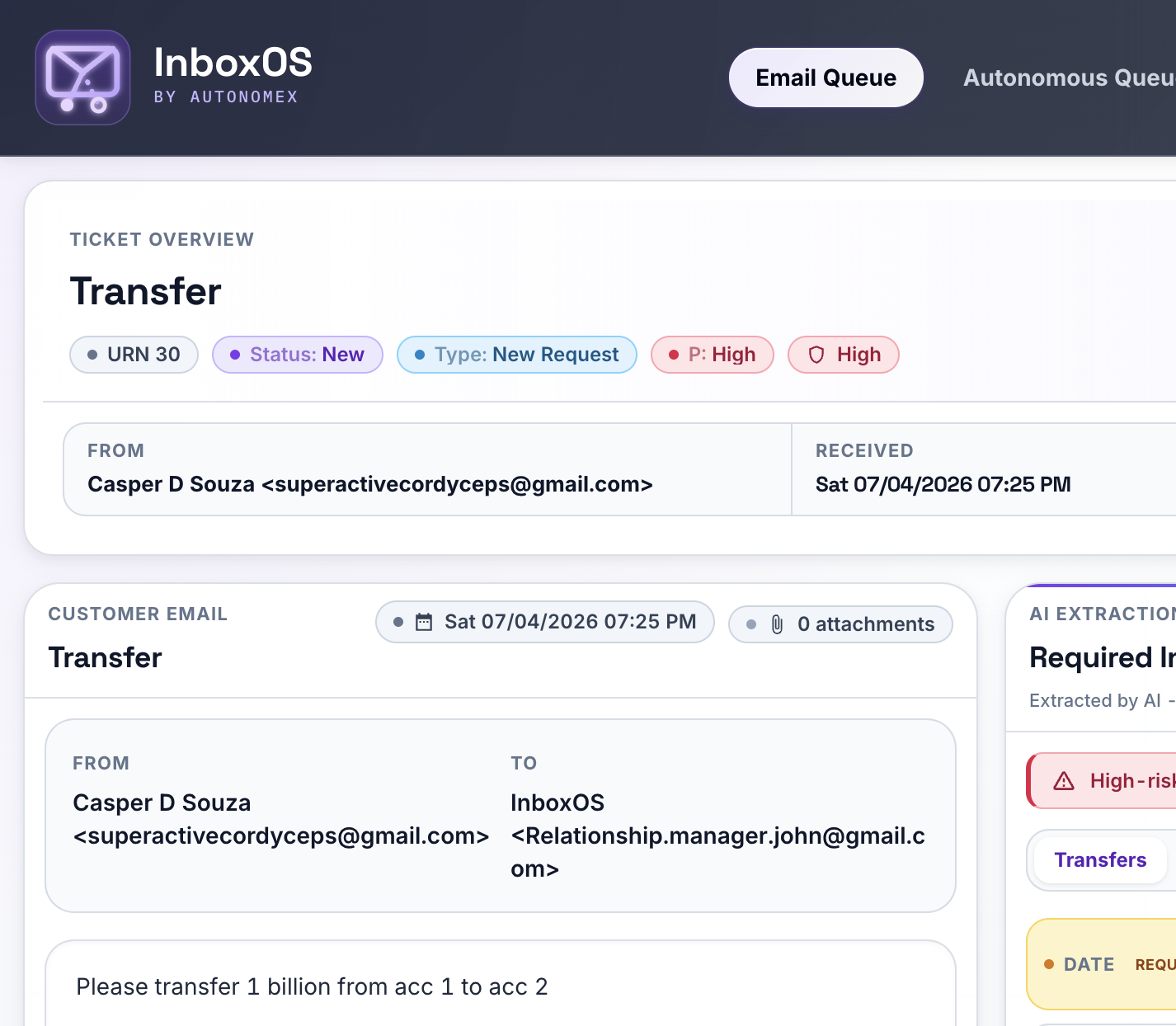
InboxOS ticket detail showing AI extraction of a $250,000 Family Trust to brokerage transfer with a high-risk intent badge
Ticket detail · AI extraction with human verification
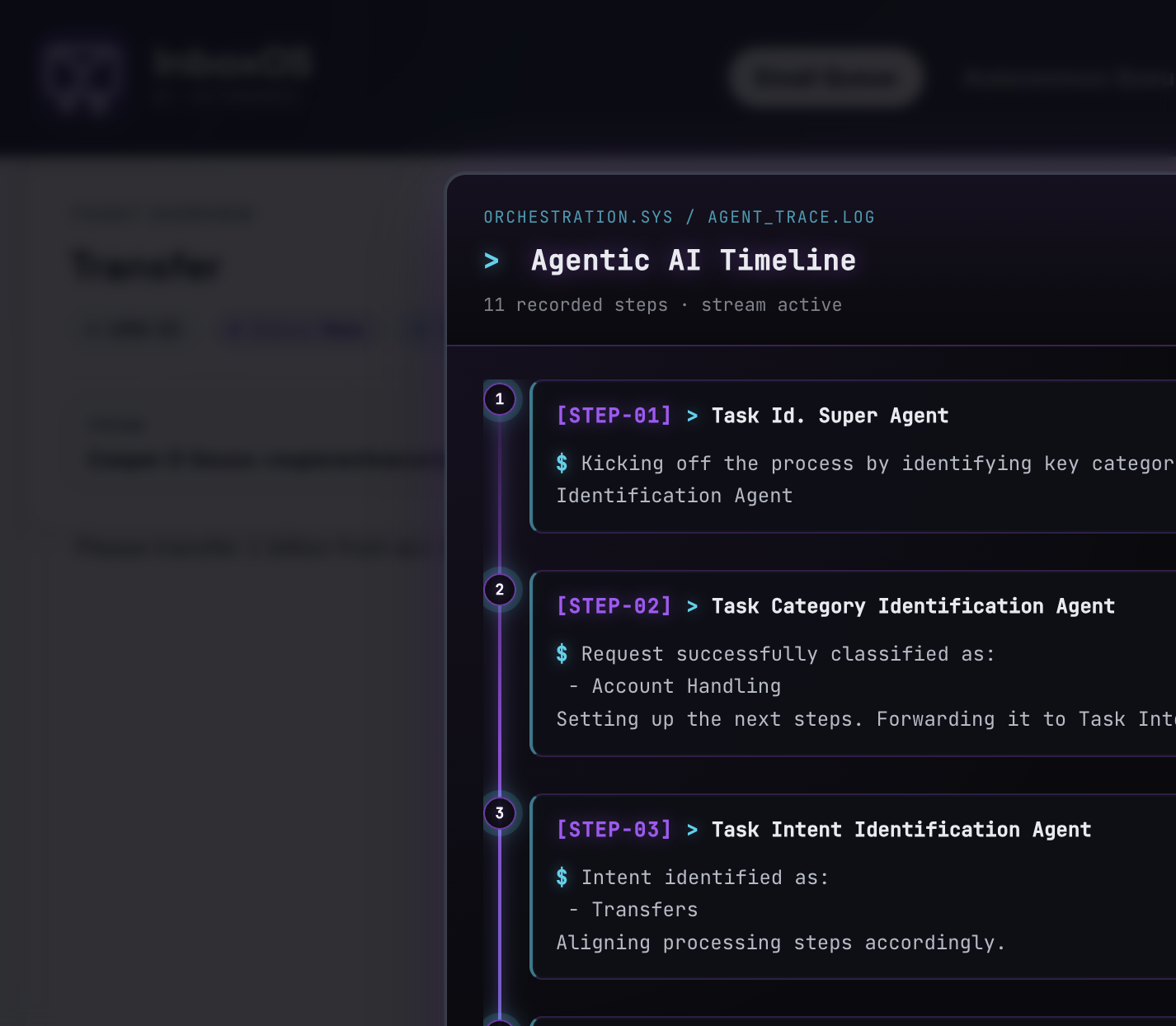
Agentic AI Timeline modal showing orchestration steps and prompt versions per email
Agentic AI Timeline · reconstructable audit trace

For your technical team

Nine agents, one orchestrated graph

A single prompt cannot show its work. InboxOS runs each email through a LangGraph state machine of nine specialized agents, so every classification decision is separable, individually versioned, and logged hop by hop. That is what makes the output auditable instead of a black box.

  • Auditable per hop Each agent records its prompt version, input, and parsed output, so you can see exactly where a verdict came from.
  • Specialized accuracy Sentiment, classification, extraction, and risk each run as a focused task instead of one overloaded prompt.
  • Independently versioned Prompts live in versioned YAML packs, so you can tune or roll back one agent without touching the rest.

Entry

Sentiment Analysis

Urgency score 1 to 10

Classify

Classification

Pack-defined categories

Intent

Intent Agent

Sub-intents with confidence

Fallback

Miscellaneous

Out-of-taxonomy mail

Router · dashed paths

Orchestrator

LLM ReAct loop that routes between agents until Watch Tower

Context

History Agent

New, follow-up, or duplicate

Extract

Extraction Agent

Structured required fields

Draft

Author Agent

Clarification drafts that a human sends

Score · feeds Decision Engine

Watch Tower

Priority, risk, and confidence

  1. Sentiment Analysis scores urgency before routing
  2. Orchestrator is the LLM-driven router between agents on each hop
  3. Classification maps the email to industry-pack categories
  4. Intent Agent derives sub-intents and confidence from the taxonomy
  5. Miscellaneous handles out-of-taxonomy messages
  6. History Agent decides new request versus follow-up versus duplicate
  7. Extraction Agent pulls structured fields per intent
  8. Author Agent drafts a clarification when fields are missing
  9. Watch Tower produces priority, intent risk, and confidence scoring

What happens at three of the hops

  • Orchestrator, the ReAct loop. After sentiment scoring it reads the current state and emits a trigger tag to choose the next agent. A single email can take several routing hops before it settles.
  • Watch Tower, the scorer. It computes priority and intent risk from the pack's per-intent metadata plus sentiment and history signals. Those confidence and risk scores are exactly what the Decision Engine reads next.
  • Miscellaneous, the fallback. When an email falls outside the active pack's taxonomy, the Orchestrator routes it here instead of forcing a wrong label, and it still lands in a queue with a full trace.

Every hop is logged in the Agentic AI Timeline, including prompt versions, parsed outputs, and routing triggers, so compliance and ops teams can reconstruct why a ticket landed where it did.

Agentic AI Timeline showing the logged orchestration steps for a classified email
Full trace visible per email, prompt versions included

Platform

Built for operations teams, not chat demos

Your supervisors get the views they already expect. A React queue UI on top of a Flask API delivers role-aware queues, structured extraction, and analytics your team can act on.

Queue views

Autonomous, manual review, and no-action queues with filters, assignment, and ticket ageing.

Information extraction

Required fields per intent, editable in place. Human edits flip touchless validation off.

Draft replies

Author agent proposes clarification emails. Staff review and edit before send.

Assignment & RBAC

JWT auth with role permissions. Assign tickets to RM, support, CSA, or escalation owners.

Analytics

Volume, sentiment, ticket ageing, and queue throughput, export-ready for ops reviews.

Audit & admin

Append-only audit log, job-run history, and admin triggers, so every sensitive action is recorded.

Decision engine

Autonomous where safe. Human where it counts.

You decide how much the AI is allowed to close on its own. The Decision Engine checks each ticket's confidence and risk against rules your compliance team sets, then sends it to the autonomous or the human-review queue. Touchless never means unsupervised.

Default autonomy rule

Thresholds live in config, not in the code, so your compliance team sets the bar.

IF confidence ≥ 7 AND intent_risk == "low" THEN → Autonomous queue
ELSE → Human review queue

Autonomous tickets close without manual handling, but outbound email always passes human review before send. High-risk or low-confidence work stays in the human-in-the-loop queues with full agent logs attached.

Autonomous queue

Structured, low-risk, high-confidence

  • Routing and field extraction without desk intervention
  • Ideal for repeatable intents in the active industry pack
  • Still fully auditable, with every agent hop logged

Human review queue

Escalations, edits, and send approval

  • Medium or high intent risk, or confidence below threshold
  • Staff edit extracted fields and draft replies
  • Explicit send action, with no auto-reply to clients

Industry packs

Domain knowledge lives in packs, not in core code

Your desk's intents, prompts, risk matrices, and required fields ship as versioned YAML packs. Adapting the pipeline to a new taxonomy means swapping a pack, not rewriting agents.

Shipped

Wealth Management

Private banking and wealth-management support desks, with 4 categories, 13 intents, and versioned prompts.

  • Portfolio handling, account changes, transfers
  • Information requests with structured required inputs
  • Per-intent priority and intent-risk metadata

Your industry could be next

One platform, built for your taxonomy

The core platform is industry-agnostic. New verticals are configured into a pack, not assumed out of the box. Insurance, legal, and healthcare are on the roadmap.

  • Custom packs for your intents and compliance language
  • Per-intent priority and risk that you control
  • Prompt registry tracks the version used on every run
Register interest for your industry

Security & data

Questions compliance teams ask first

Plain answers, no marketing gloss. Forward this section or download the one-pager for your review committee.

Download one-pager (print to PDF)

Where does client email content go during AI analysis?

Email bodies and attachment text are processed by the LLM provider you configure (OpenAI via API today) to classify intent and extract fields. Messages are sent through the provider’s API and, under standard OpenAI API terms, are not used to train public models. All classification results, extracted fields, and agent logs are stored in your deployment’s database (SQLite by default; PostgreSQL on roadmap).

Can the AI email clients without a human?

No in the current release. The author agent may draft clarification emails when required fields are missing, but outbound send requires explicit staff action in the queue UI. feature_flags.autonomous_send ships off by design.

How do we reconstruct why a ticket was routed?

Every agent hop is logged in the Agentic AI Timeline: orchestrator routing triggers, parsed LLM outputs, and the prompt versions used per run. Sensitive UI actions (assignment, send, admin triggers) append to an immutable audit log.

Who can access what in the application?

JWT authentication with role-based permissions gates queue views, ticket edits, sends, and admin surfaces. Roles include Relationship Manager, Support Professional, Client Service Associate, Escalation Specialist, and admin, each mapped to specific API permissions.

How is InboxOS deployed, and is our data multi-tenant?

Today it is Docker single-tenant: one organization per instance on your infrastructure. Email credentials and API keys resolve through configurable secret refs, not source code. Multi-tenant SaaS is roadmap, not current product.

What integrations are supported today?

Gmail via IMAP ingest and SMTP send. Outlook and additional connectors are on the roadmap and not claimed as shipped. SSO and enterprise identity are also roadmap items.

What are the pilot terms?

The wealth-management launch runs as a limited design-partner pilot. InboxOS is deployed single-tenant on your infrastructure, the Wealth Management pack is tuned to your desk's intents, and human approval before send stays on throughout. In return, we ask design partners for regular feedback and input into the roadmap. Commercial terms are scoped per partner during the pilot walkthrough.

Enterprise readiness

What compliance buyers ask first

RBAC

JWT authentication with permission-gated routes. Roles map to queue actions, admin jobs, and audit access.

Append-only audit log

Auth events, assignment changes, and sensitive ticket actions recorded immutably for reconstruction.

Docker single-tenant

Deploy on your infrastructure today, one organization per instance. Multi-tenant SaaS is roadmap, not current product.

Human review before send

AI drafts; people approve. No unsupervised client-facing replies in the current release.

Who it's for

Internal teams on regulated client email

Customers interact by email only. Your staff work tickets in InboxOS, with views tuned to how each role operates.

Relationship Manager

Own the client relationship

Review high-touch threads, approve drafts, and keep context on complex portfolios without re-reading entire chains.

Support Professional

Clear the operational queue

Work manual-review tickets with pre-extracted fields, suggested intents, and clarification drafts ready to edit.

Client Service Associate

Handle volume with consistency

Route routine account and document requests through structured workflows, with less copy-paste from old threads.

Escalation Specialist

Intervene on risk and exceptions

Prioritize by sentiment and intent risk, override AI extraction, and assign ownership when cases cross desks.

Pilot program

See InboxOS on your workflows

Book a demo

Walk through ingest, the nine-agent pipeline, and human-review queues with your compliance and ops stakeholders. Gmail integration ships today; additional connectors are on the roadmap.

What the pilot includes

  • Your desk, your taxonomy. The Wealth Management pack is tuned to the intents and required fields your team actually handles.
  • Deployed on your infrastructure. Single-tenant Docker, one organization per instance, using your own email and API credentials.
  • Human approval stays on. The AI drafts and routes; your staff approve every outbound reply. Autonomous send ships off.
  • What we ask of design partners. Regular feedback and a direct line into the roadmap and the pack tuned to your desk.

Typical pilot walkthrough: 30 minutes · ops and compliance welcome · response within 1 business day

Prefer email directly? sam@autonomex.ai